
New in Gumshoe!
Three updates just shipped, starting with the one a lot of you have asked for: control over exactly when your recurring reports run.
Here's what's new:
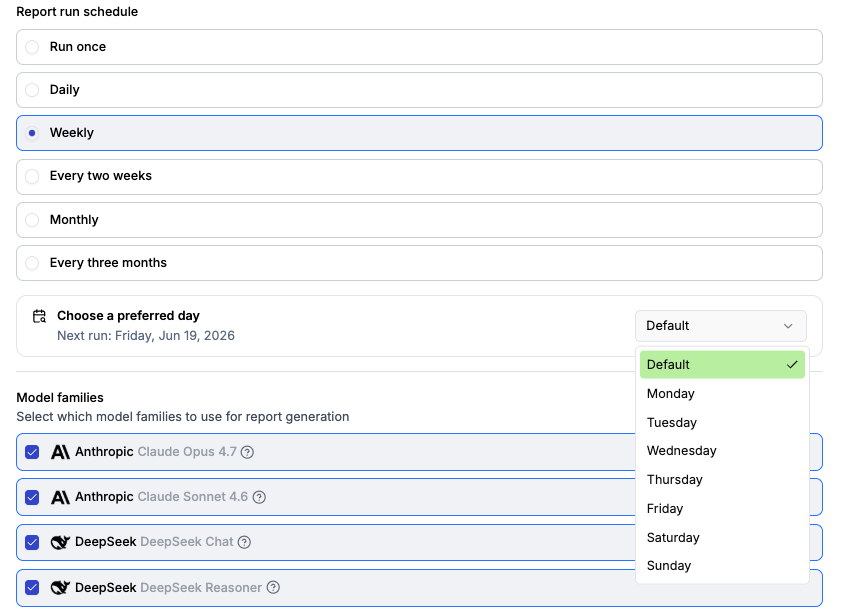
Set the day your recurring reports run
Recurring reports now run on the day you pick. Choose a specific day of the week for weekly reports, or a specific day of the month for monthly ones, and every future run locks to it. Line your reports up with your reporting cycle instead of whenever the clock happens to start.
Click here to learn how to set your report schedule.
Rename brands on a report, even after it runs
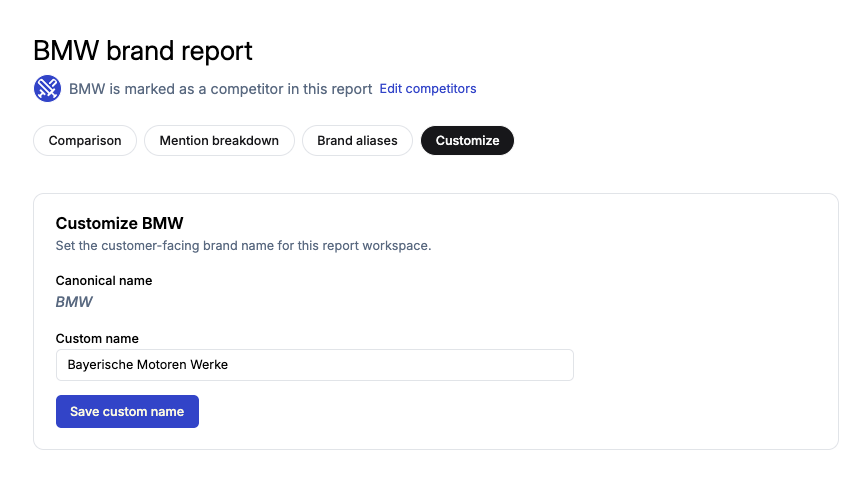
Reports have a new Customize tab. If the AI used the wrong name for your brand (or a competitor's), you can set a custom name, and the report updates to match. No re-running required, and your custom names now carry through to exported report PDFs too.
Read the details to learn more.
Latest AI models now in Gumshoe
We've upgraded to Claude Opus 4.8 from Anthropic and Google's Gemini 3.5 Flash. Both are now live across your reports, so your visibility data keeps pace with the models your audience is using.
Click here to learn how to change the AI models in your Gumshoe report.

All updates above are live for everyone right now. Log in to app.gumshoe.ai to take them for a spin, or reply to this email to schedule a walkthrough.
Until next time,
The Gumshoe Team